Monday, March 27, 2023

 C PROGRAMMING 

INTRODUCTION  : 

         C is a general-purpose programming language developed at AT & T's Bell Telephone Laboratories (USA) in 1972 by Dennis Ritchie. Since it was originally designed for and implemented on the UNIX operating system, therefore, it is strongly associated with UNIX though nowadays it is running on almost all operating systems. Here are most common reasons why C is still so popular:


- C is one of the most popular programming languages of all time to create system software as well as application software.

- C is a standardized programming language with international standards.

- C is the base for almost all popular programming languages.

- C is one of the foundations for modern computer science and information technology.

- The language of choice for serious programming.

- Ease of understanding and learning, and one of the most commonly used programming languages in colleges and universities.

- Once students have learned C, then it will be easy for them to pick up any other languages.

simple application in C:

/*welcome.c (program name)*/
/*The following program displays the message "Welcome to C Programming"*
#include <stdio.h>
main()
{
printf("Welcome to C Programming");
}

Structure of the above C Program

Comments

Comments are a good way to better understanding of the program statements. In C programming language the comment entries start with a "/*" and terminate with "*/" at the end of the line. The compiler (a compiler is a computer program which translates source code written in a programming language into object code.) ignores the comment statements.

In the above program, the lines

/*welcome.c ( program name )*/
/*This program displays the message "Welcome to C Programming"*/

are comment lines.

#include directive

The #include directive instructs the compiler to include the contents of the file "stdio.h" (standard input-output header file) enclosed within angular brackets.

main() function

In C programming language the main() function serves a special purpose, it tells the compiler where the program start. Every C program must have one and only one main() function otherwise compiler can not understand the starting position of a program. The body of the main function surrounded by curly braces ( { } ). In the above program there is only one statement [ printf("Welcome to C Programming"); ] between the curly braces. Each statement in a C program terminated with a semicolon( ; ).
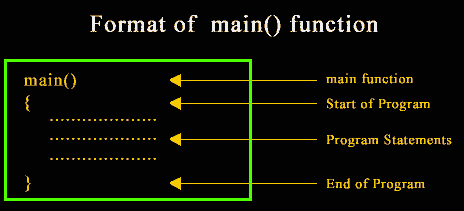
format of main function in c

Compile and execute C program in Linux and Windows

Introduction

In this document, we will see how we can compile and execute C program in Linux and Windows. The document also contains a list of C compilers available.

We will see how to compile using Visual C++ 2008 Express Edition, Turbo C++, wxDev-C++ in Windows. For Linux and Unix operating systems, we will be using GNU Gcc to compile C program. Both of these are free.

Contents:

Install, compile and execute C program with Visual C++ 2008 Express Edition with SP1 in Windows

Download and install

To download, point your browser to http://www.microsoft.com/visualstudio/en-us/products/2008-editions/express and select Language and click on Free Download. After you complete download, run the executable file, it will ask you to select whether you want to install some other optional products, uncheck those options so that you can install only the product required. The installation process will start downloading other files from the Microsoft site and depending upon your connection speed it will take a while to complete the installation.
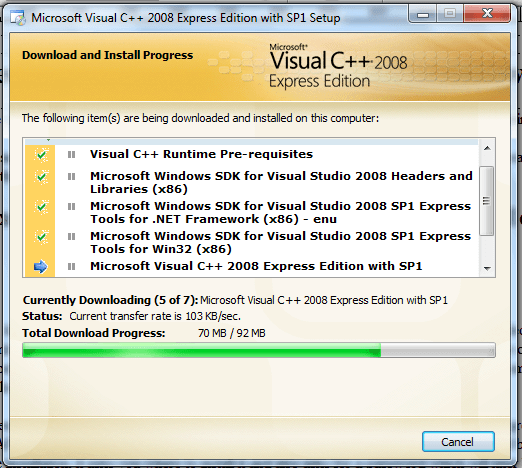
visual c++ 208 express edition

Once the installation is complete, in Windows 7, start the Visual Studio 2008 Command Prompt from All Programs > Microsoft Visual C++ 2008 Express Edition > Visual Studio Tools > Visual Studio 2008 Command Prompt.

visual studio command prompt

Write, compile and execute your first program

Step 1 : type notepad demo.c (you can replace the filename with your own) and press Enter, when asked if you want to create a new file, say yes.
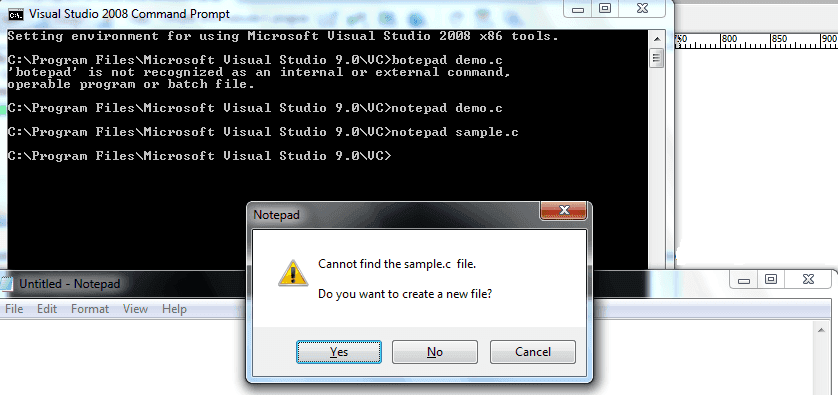
visual studio command prompt prompt

Step 2 : type the following code and click File > Save . When asked where to save the file, select the location suitable.

Step 3 : Type cl sample.c and press enter now. This will compile the program to create an executable file (.exe).
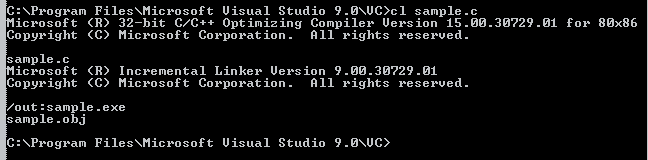
compile C program Windows 7

Step 4 : Now simply type the name of the file sample and enter. That will show you the output.
Output C program Windows 7

Install, compile and execute C program with Turbo C++ in Windows

Obtain and install

Turbo C++ is very popular C compiler and IDE. The problem is, Borland, the creator organization of the compiler and IDE does not provide any option to download the compiler and IDE. But if you google with "turbo c++ download", you will get plenty of sites to download the compiler and IDE. There are three files to download - TC.exe, tc.r00 and tc.r01. After downloading, run TC.exe file it will create a folder TC at the end the installation process. To run turbo C++, enter bin directory within TC and look for tc.exe. Double click the tc.exe file and turbo C++ IDE will open.

Run Turbo C++ in full screen in Windows 7

Those who are running Turbo C++ is Windows 7, when the IDE is opened, click on "Ignore" in the popup window saying that it does not support full-screen mode. Now, click on the top left corner of the Turbo C++ window and select "Properties" . Select "Font" tab and change the font to "Lucidia Console" from default "Raster fonts". Also, change the font size to "28". Now select "Layout" tab and set "width" as 80 and "Height" as 25 under "Screen Buffer Size". Under "Window Size", change "Width" as 60 and "Height" as 25. Under "Window Position", set the value of "Left" and "Top" both as -4. Make sure "Left System Position Window" is unchecked. Click "Ok" to close the properties window. Now you can see the Turbo C++ IDE in full screen.
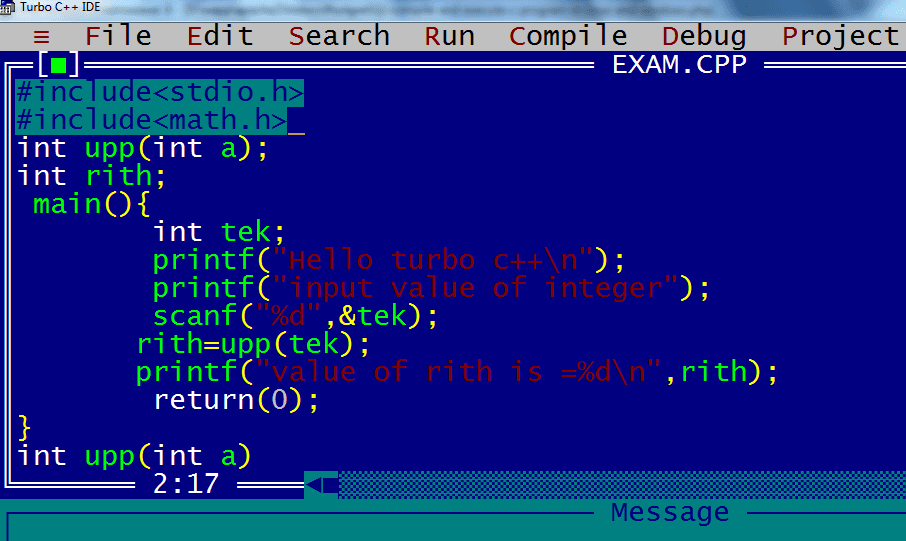
turbo c++ window

Write, Compile and Run C program

Open a new file from File > New in the Turbo C++ IDE. Write a small program in the IDE.

Now go to File > Save As and save the program with the filename of your choice (make sure extension of the filename is .c).

Click on Options and go to Directories. Click on Directories and set Output Directory as you want and Source Directory as where you have saved the C program file.

Now go to compile and click on Compile. And then Click on Run. You will see the output of your C program.

Write, Compile and Run C program using wxDev-C++ in windows

wxDev-C++ is easy to use IDE which you may opt for to write C Program. You may download the installer from wxdsgn.sourceforge.net. We found it working perfectly on Windows 7 and Windows XP. It also installs MinGW along with and you don't need to set any environment variables. The default compiler for this IDE is gcc.

After downloading the installer, run the exe file by double clicking on it and an installation wizard will guide you to install. Once you finish the installation, you start it from Programs and the first time when you run it, it takes a while for parsing header files. The IDe window looks like following:
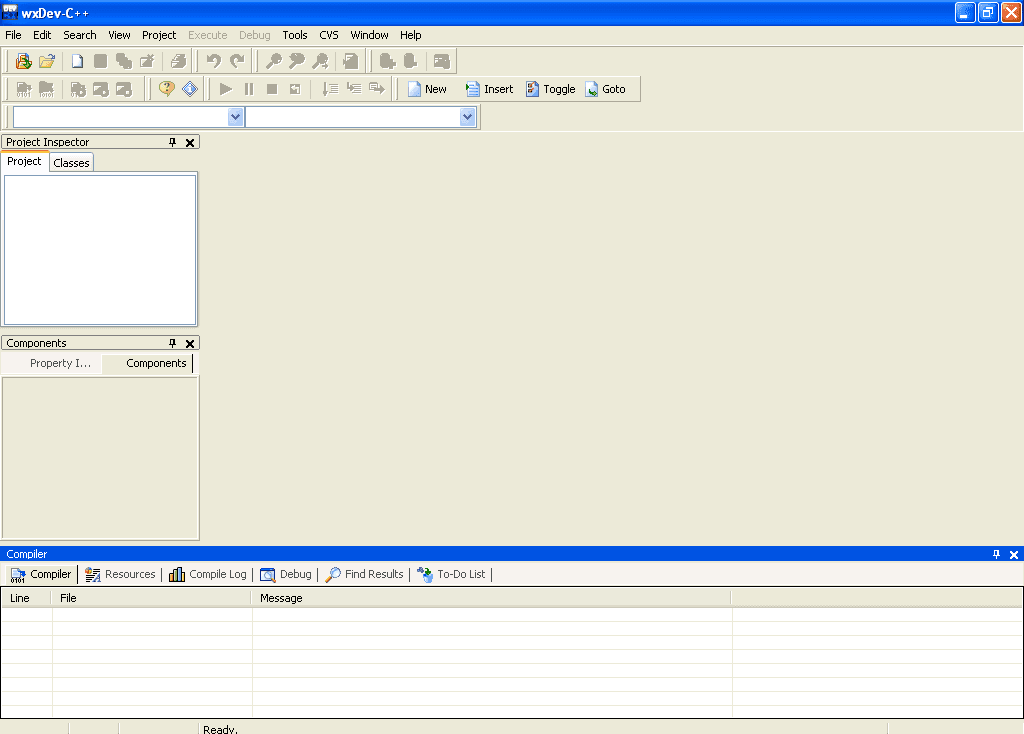
wxDev-C++ IDE Window

You may start programming by clicking on File > New > Source File in the window. Note that while saving the file, you must select file type as C as this IDE supports C++ also.
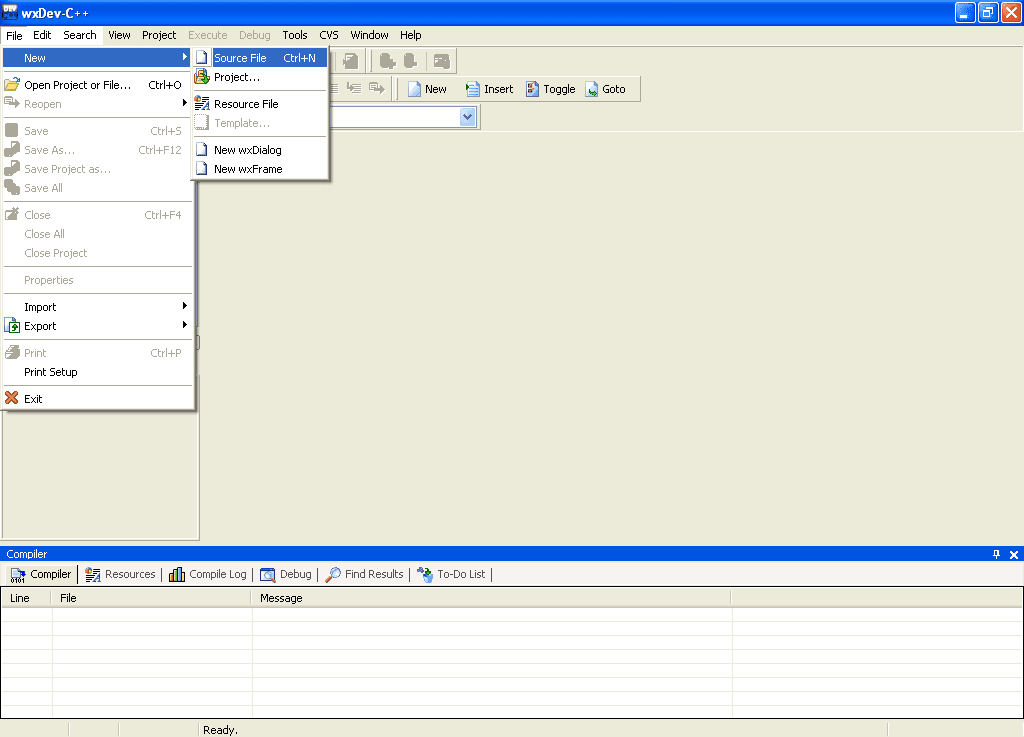
wxDev-C++ IDE Window

You may use F9 or as shown below to Compile and Run program.
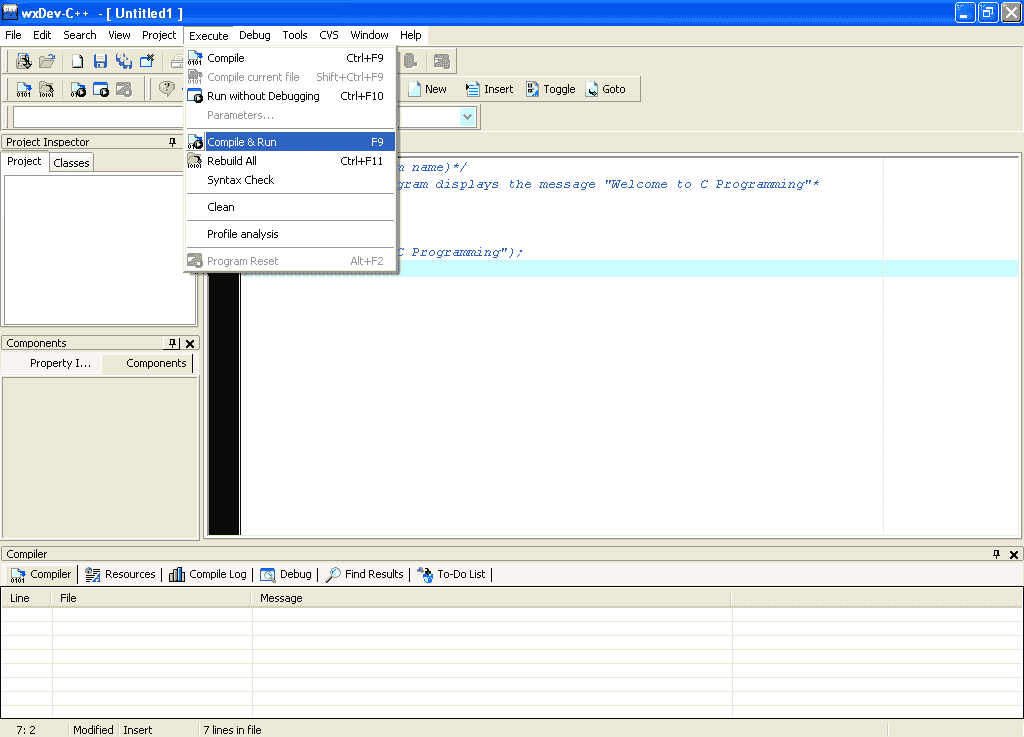
wxDev-C++ IDE Window

When compilation is done, it opens a new window to show you output.
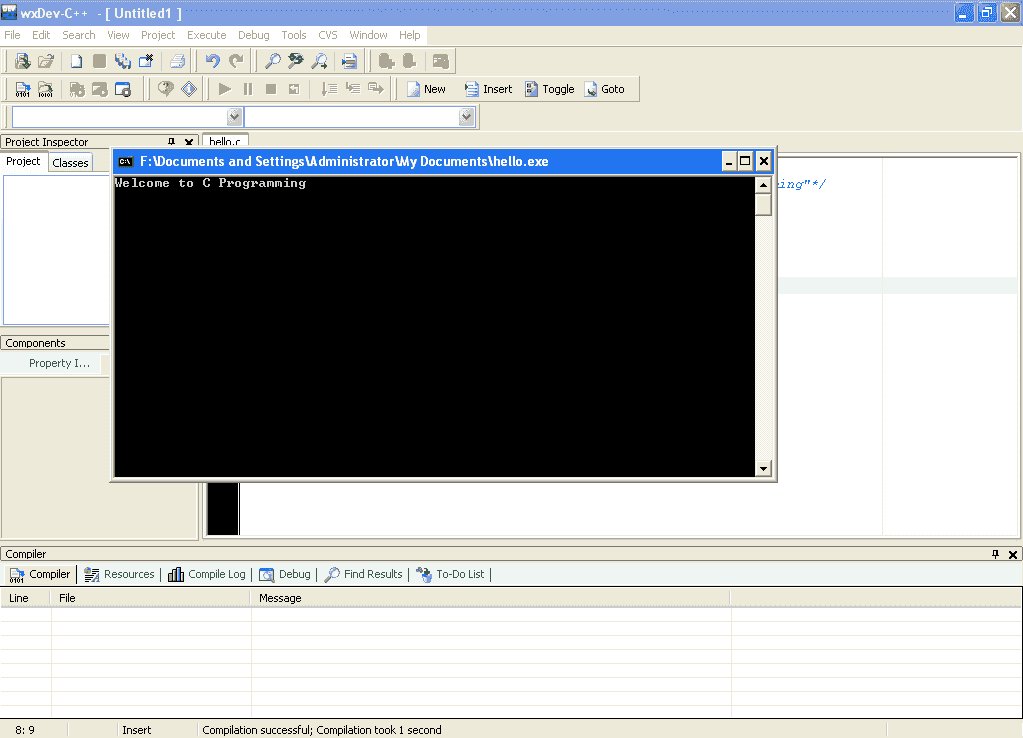
wxDev-C++ IDE Window
If you have errors, it shows you in the pane below like following.
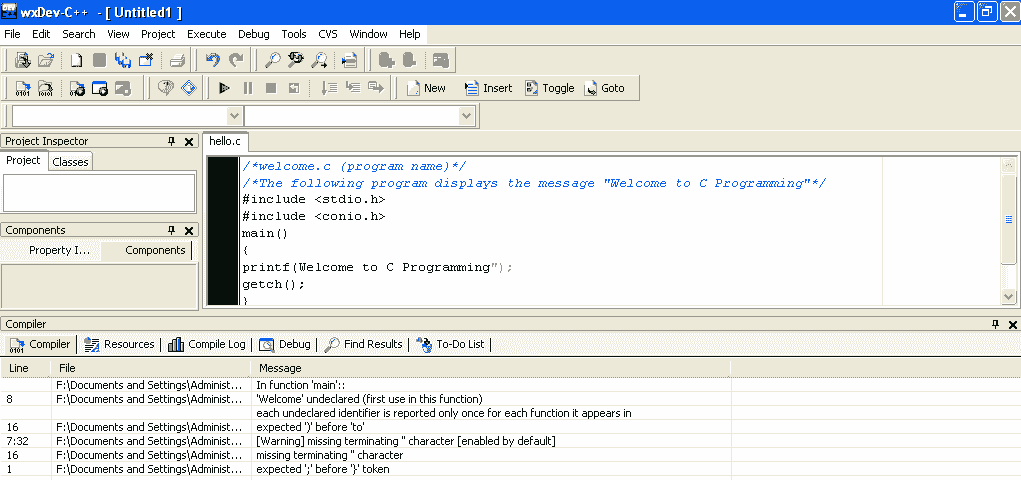
wxDev-C++ IDE Window

Though slightly dated, we find wxDev-C++ an excellent IDE for programming C. You may try it if you are using Windows.

Install, compile and execute C program in Linux

Most of the time, when you are installing Linux, GNU Gcc compiler is already installed. If not, run the following command (our system is Ubuntu Linux):
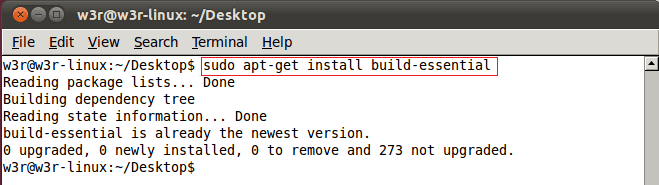
c install linux

If C compiler is already installed, it will show you a message like above. If not, it will install all the necessary packages.

Now open a text editor and write a small C program like following and save it as demo.c :

 #include <stdio.h>
main()
{
printf("Welcome to C Programming");
} 

Now run the command as shown below to compile and execute the file :
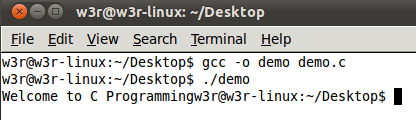
c-program run linux

This how you can install GNU Gcc compiler, write a C program and run it under Linux.

List of the C Compilers

The following table is a list of the C compilers available. This is not a complete list but this will give you a fair idea about various C compilers, which OS / Platform they support and whether it has a programming environment.

CompilerAuthorOperating SystemIDE?License type
AMPCAxiomatic Solutions Sdn BhdWindows,Unix & OtherYesProprietary
Amsterdam Compiler KitAndrew Tanenbaum and Ceriel JacobsUnix & OtherNoBSD
CCS C CompilerCCS, Inc.Windows,Unix & OtherYesProprietary
ClangLow-Level Virtual MachineWindows,Unix & OtherNoBSD
DMS Software Reengineering ToolkitSemantic DesignsWindows,Unix & OtherNoProprietary
GCC CGNU ProjectWindows,Unix,IBM mainframe, AmigaOS, VAX/VMS, RTEMSNoGPL
RCC (RCOR C Compiler)Rodrigo Caetano (rcor)Windows,UnixNoGPL
Interactive CKISS Institute for Practical RoboticsWindows, Unix, Mac, Linux, IRIX, Solaris, SunOSNoFreeware
LabWindows/CVINational InstrumentsWindows,Unix & OtherYesProprietary
lccChris Fraser and David HansonWindows,Unix & OtherWindows onlyFreeware (source code available for non-commercial use)
Mark Williams CMark Williams CompanyWindows,OtherYesProprietary
Microsoft CMicrosoftWindowsYesProprietary
NwccNils WellerWindows,Unix,OtherNoBSD
Open64SGI Google HP Intel Nvidia PathScale Tsinghua University and othersUnix,OtherNoGPL
Pelles CPelle OriniusWindowsYesFreeware
PGCCThe Portland GroupWindows,Unix,Other— Mac OS XYes — Visual Studio on WindowsProprietary
Portable C CompilerAnders Magnusson and othersWindows,Unix,OtherNoBSD
Power CMix SoftwareOtherNoProprietary
QuickCMicrosoftWindowsYesProprietary
SAS/CSAS InstituteWindows,Unix,Other-IBM mainframe, AmigaOS, 68K, 88K, UnixYesProprietary
Tiny C CompilerFabrice BellardWindows,UnixNoLGPL
Turbo CEmbarcaderoOtherNoProprietary - V 2.01 freely available
CCS C CompilerCCS, Inc.Windows,Unix,OtherYesProprietary
MikroC CompilerMikroElektronika, Inc.Windows,Unix,OtherYesProprietary
ups debugger[1] (includes C interpreter)Tom Hughes, Ian Edwards, and othersUnix,Other-Solaris, SunOSYesGPL
VBCCDr. Volker BarthelmannWindows,Unix,OtherNoFreeware (source code available, modification not allowed)
XL CIBMUnix-AIXEclipseProprietary

P

Saturday, January 8, 2022

Tally Basic (English)


What is Tally 

Tally is an accounting software used to record and keep the financial transactions of a company, trust or financial transaction institution from computer. So that the financial status of the business will be known.

1.       1. Knowledge of capital: –

2.       2.Knowledge of buying and selling

3.       3.Knowledge of debtors and creditors

4.       4.Knowledge of the financial position of the business

5.       5.Profit and loss knowledge

Version of Tally

1.       Tally 3.0 (1990) – Tally 3.0 is the first version of Tally. Which has been used for basic accounting requirements of small businesses. it only supports Microsoft DOS.

2.       Tally 3.12 (1991)

3.       Tally 4 (1992)

4.       Tally 4.5 (1994)

5.       Tally 5.4 (1996)

6.       Tally 6.3 (2001)

7.       Tally 7.2 (2005)

8.       Tally 8.1 (2006)

9.       Tally 9 (2006)

Definition of Accounting

Accounting is the process by which financial transactions have to be identified, entered and processed by preparing a report. By which the financial position of the business can be known, it is called accounting.


Business:

The legal work done for the purpose of making profit is called business. Business is a broad term under which business, Production work, Sale or purchase of goods or services, Bank, Insurance, Transport companies come under it.

Types of Business

1.Manufacturing (production)

2.Trading (Sales)

3.Servicing (Service)

Trade (Business)              The sale and purchase of goods done for the purpose of making a profit is called trade.


Proprietor (Owner or Owner):

The person starting the business, who arranges for the necessary capital and carries the risk of loss and loss of the officer to receive the profit., The owner of the business is called.


Capital:

Money to start a business by the owner of the business, It is imposed as cash or other property, it is called capital.

Drawing (Withdrawal)

Goods or cash which are taken out by the owner of the business for personal use of the business, This is called withdrawal or personal expenditure. Withdrawal reduces the amount of capital.

Transaction (Transaction or transaction)

Double sided currency, Mutual exchange of goods or cash.

Types of Transaction
1. Cash Transaction (Cash transaction)
2. Credit Transaction (Credit or credit transaction)
3. Bill Transaction (Bill transaction)

Goods

The goods are called that thing, Which is traded – traded or traded. Raw material obtained for the manufacture of goods under goods, Can be semi-finished material or finished goods

Purchase:

When goods are purchased for sale by the merchant, It is called purchasing. It can be purchased in the form of raw material or finished goods.

Purchase Return:

Goods that are returned due to any of the purchased goods.

Sales:

When the purchased goods are sold for the purpose of profit, it is called selling.

Sales Return :

Any goods sold are returned by the customer due to any reason. Sales return On entry, it is entered into a journal voucher or debit note.

Stock

After a certain period of time, It is called a stock, on the last day of a business year, which remains unsold, Assets

Assets:

All such permanent and temporary items of business which are necessary to run the business and which are owned by the businessman, The assets are called. Like – machine, land, Furniture, The printer, Computer etc.


Types of Assets  

1. Fixed Assets: Permanent Property : Equipment, used for personal, Furniture, The printer, Custom etc.

2. Current Assets :  Movable property (cash) – cash. Bank cash etc.

Liabilities :

The liability of the business is called liability. There are some essential states in the business., Those who have the obligation to repay the business like – Capital, Bill of credit, Creditor, Bank overdraft etc.

Revenue :

Revenue refers to the amount received regularly from the sale of goods or services. Business day-to-day activities like rent – rent, Interest, The commission, Discount, Dividends etc. are also called revenue.

Expenses

Goods in business, Costs incurred for producing or acquiring goods and services. Payments for receipt of goods and services are covered under expenditure. wage, The freight, Salary paid on delivery and sale of railway carriages and goods, The rent, advertisement, the expense, Insurance is also included in the expenditure. The cost of increasing the revenue in brief is called expenditure.

Types of Expenses

1. Direct Expenses :

Payment for receipt of goods and services – Wages, Freight, Payment on delivery and sale of railway carriages and goods

2. Indirect Expenses

Increase revenue, the wages, the rent, advertisement, the expense, Insurance etc. Expenditure (Spend): – Spend is the amount paid to increase the profit-earning capacity of the business. Expenses that are paid for the acquisition or acquisition of assets in a business are called expenses.


Gain (Benefit)

This Is a kind of monetary gain, Which results from business like if 1,00,000 Goods worth Rs. 1,50,000 If sold in rupees 50,000 Receipt of money will be called profit.

Cost

Raw materials used in business and its functions, Service and loan, The sum of all direct and indirect expenses to be produced or used to make it useful is called cost of goods. The item includes the raw material or assets.

Discount (Deduction or Discount)

Concession granted to the concession given by the merchant to his customers, It is called discount. It is also called a gift. There are two types of discount –

1.  Trade Discount (Merchant discount) :  The seller makes a discount (discounted) to his customers in the face value, ie the list price, while purchasing the goods., It is called a trade discount with the aim of increasing the sale of goods. It is not done in the accounting books

2. Cash discount : – Exemption provided for payment of cash or check value in a fixed or fixed period, It is called cash discount, it is used in books of accounts.

Debitor (Debtor )

The person, Borrow goods or services from a firm or institution, It is called the debtor or debtor of the business.

Creditor

The person, Goods or services are borrowed from a firm or institution, it is called a creditor.


Entry

Entering the transaction in the books of account is called Entry.

Whole sale (Turn Over)

The sum of the cash and credit sales that occur in a certain sum is the total sales or Turn over

Bad Debts

Unable to recover the amount due to the inability of the debtor or going bankrupt, For a creditor, it is called bad debt or unapproachable loan.

How to Create Company

Tally To work in User mainly 4 To do work –

1.       Company Creation (Company making)

2.       Ledger Creation

3.       Inventory Management (stock management)

4.       Voucher Entry


Company Creation

Follow the following steps to create a company in a tally –

1. Go to company info menu
2. Create Company Select the option of

3. Shortcut key Alt + F1 or shortcut key Alt + F3 By going to create Company Choose Option.

As soon as we choose this option company creation Of window Will open in which fill the information sought and Ctrl + A button Press and save.


Details to be filled in company creation window

Fill Basic Data

Directory : This field is already full, this field contains the path of the tally , Where Tally Software Load.

Name : Enter that name in this field , Name by which you want to create a company.

Mailing Name :  Enter the company’s mailing name in this field

State :  In this field, enter the state in which your business is established.

Pin code : Enter the pin code of the place in this field , Where the companies are established

Telephone Number : Enter the company’s telephone number in this field.

E-mail Address : Enter the company’s email address in this field.

Website : Enter the company website in this field

Financial Year From – Enter the starting date of the financial year

Books Beginning From – Enter the dates of opening of books of accounts in this field.

Security control : If you want to activate security on the company entering the user name and password.


What is voucher

Voucher is a type of written statement detailing all Financial or Non-Financial transactions. voucher is an important part of the business, it uses Voucher in all types of business.

Types of Voucher –

1.       Accounting Voucher

2.       Inventory Voucher

Accounting voucher

Accounting voucher is the voucher in which the book is maintained according to financial transactions .

Types of Accounting Vouchers

Contra Voucher (F4)

Payment Vouchers(F5)

Receipt Voucher (F6)

Journal Vouchers (F7)

Sales Vouchers (F8)

Credit Note Voucher (Ctrl + F8)

Purchase Vouchers (F9)

Memo Voucher (Ctrl + F10)

Debit Note Voucher ( Ctrl + F9)

Inventory Voucher

The way Accounting Voucher work in Accounting System. Similarly, inventory is in vouchers, it Record of goods received or sent.

1.       Press F11 Feature button.

2.       Press the F2 button or select the inverntory features.

3.       Integrate Accounts and Inventory – Yes.

4.       Enable Purchase Order Procesing – Yes.

5.       Enable Sales Order Processsing – Yes.

6.       Use Rejection inward and outward notes – Yes.

7.       Use Material in and out Vouchers – Yes.

8.       Thus, after all the setting, save the ctrl + A button by press. You’ll inverntory Voucher activate after save.


Types of Inventory Voucher

Receipt Note (Alt + F9)

Delivery Note (Alt+F8)

Rejection Out (Alt+F6)

Rejection In (ctrl+F6)

Stock Journal (Alt+F7)

Physical Stock (Alt + F10)

Sales Order (Alt+F5)

Purchase Order (Alt+F4)


Receipt Note Voucher

It is a inventory voucher through which we can use order given goods/goods for purchase. receipt note is Entry when Goods is received. entry in Receipt Note, our stock begins to appear. Receipt Note Voucher has a shortcut key Alt + F9.


Delivery Note Voucher

It is a inventory voucher through which we receive order for Sales on goods/goods. the Delivery Note Voucher is Entry after sending the Goods. Our stock decreases as soon as we entry in the Delivery Note Voucher. Delivery Note Voucher has a shortcut key Alt + F8.


Rejection Out Voucher

It is a inventory voucher through which we purchase the goods given order/goods. When Goods is received, the item is returned from some item damage or any other reason. Then entry is done in Rejection Out Voucher. As soon as we entry in the Rejection Out Voucher, our item of the stock begins to decrease. Rejection Out Voucher has a shortcut key Alt + F6.


Rejection In Voucher

It is a Inventory Voucher through which we have received order for Sales/goods. When Goods is deliver, it comes back to item from some item damage or any other reason. Then entry is done in Rejection In Voucher. As soon as we entry in the Rejection in Voucher, our item of stock begins to look more visible. Rejection in Voucher has a shortcut key Alt + F7.


Stock Journal Voucher

It is a inventory voucher through which we transfer stock from one godown to another godown stock.

For example – we have a godown, the first home godown and the second office godown in which we keep stock.

Stock Journal Voucher is also used for Manufacturing process in which Raw Material is transfer in Finished Goods.

Physical Stock Voucher

Physical Stock Voucher is used to record the actual stock, which can be Verify or Count. When we don’t match stock and physical stock written in our books, we difference stock entry we do it in Physical Stock Voucher.


Sales Order Voucher

It is a inventory voucher through which we can use goods/goods for Sales. Goods order, which we Entry in Sales Order Voucher. entry in Sales Order Voucher does not make any difference in stock. the stock is reduced only when Sales Order is entry in Delivery Note Voucher. Sales Order Voucher has a shortcut key Alt + F5.


Purchase Order Voucher

It is a inventory voucher through which we purchase goods/goods for the purchase. Goods order, which we Entry in Purchase Order Voucher. entry in Purchase Order Voucher does not appear in stock. Purchase Order stock add only when entry in Receipt Note Voucher. Purchase Order Voucher has a shortcut key Alt + F4.


Ledger Under Group

Ledger

Ledger Under Group

Capital A/c

Capital Account

SBI Bank

Bank Account

Furniture A/C

Fixed Account

Purchase A/c

Purchase Account

SGST

Duties & Taxes

CGST

Duties & Taxes

IGST

Duties & Taxes

Shri Cloth Store Raipur

Sundry Creditor

Electricity Bill A/c

Indirect Expenses

Food & Snacks

Indirect Expenses

Telephone Bill A/c

Indirect Expenses

Bank Interest Received A/c

Indirect Income

Rent

Indirect Expenses

Trisha Cloth Cneter

Sundry Debitor

Sales

Sales

Wages A/c

Direct Expenses

Purchase Return A/c

Purchase Account

Petty Cash A/c

Cash Account

Sales Return

Sales

Cash Discount Received A/c

Indirect Income

Cloth Damage

Indirect Expenses

Computer System A/C

Fixed Assets


Tuesday, December 7, 2021

 PROJECT ON 
HTML 

1.     FRONT PAGE OF NAC MIT P&T 

2.     DIPLOMA COURSE (DCA)

3.     CERTIFICATE COURSE DETAILS 

4.     ADMISSION FORM

5.     SCHOOL TIME TABLE 

6.     ORDER / UNORDER LISTED 

7.     PAGES LINKING 

8.     IMAGE GALLERY 

9.     MARQUEE

 EXAM TIME TABLE

( DEC 2021 )

TIME : 11:00 - 01:00PM                                                             M.M.: 100

DATE                                 DAY                                                    PAPER

22/12/2021                    WEDNESDAY                   FUNDAMENTAL OF COMPUTER & OPERATING                                                                                   SYSTEM

23/12/2021                    THURSDAY                      MS OFFICE 

24/12/2021                    FRIDAY                             TALLY

27/12/2021                    MONDAY                          PAGE MAKER

28/12/2021                    TUESDAY                         PHOTOSHOP

29/12/2021                    WEDNESDAY                   HTML

30/12/2021                    THURSDAY                      C LANGUAGE (PGDCA)